
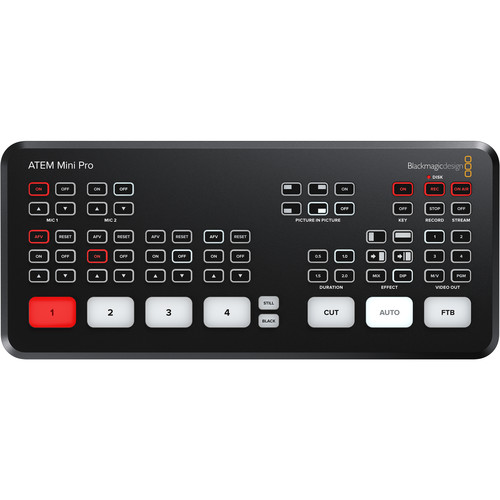
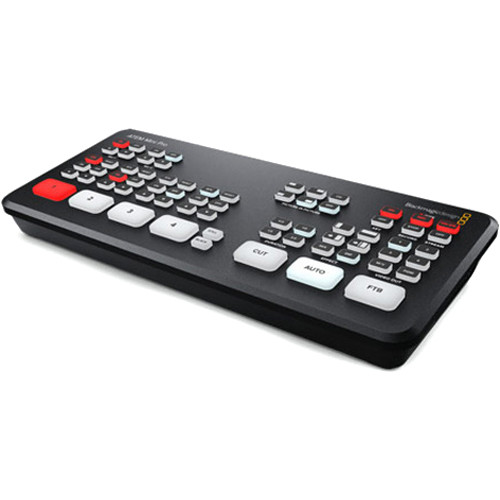
Blackmagic Design ATEM Mini Pro HDMI Live Stream Switcher
₨ 130,000.00
4-Channel Live Stream HDMI Switcher
Control up to Four BMPCC 6K/4K Cameras
Live Tally, Stream and Record Status
Record Button, Channel Preview Multiview
2-Channel Digital Audio Mixer per Source
HDMI Output, Ethernet ATEM Control
Media Player, Computer Input Support
Upstream and Downstream Keyers
Color and Pattern Generators
DVE Transition, Chroma/Luma Keyers
Related Products
Blackmagic ATEM Mini Pro Price In Pakistan
Blackmagic Design ATEM Mini Pro Overview
The ATEM Mini Pro by Blackmagic Design is an advanced, four-input live production switcher with an integrated control panel, designed for professional multi-camera live streaming. This device builds on the features of its predecessor, the ATEM Mini, and offers seamless live streaming up to HD video resolution, suitable for internet broadcasts or applications such as gaming, corporate presentations, or high-definition camera footage.
Key Features and Enhancements
The ATEM Mini Pro introduces several significant updates to enhance its usability and functionality. These include a built-in hardware encoder, live stream data rate and status monitoring, simultaneous USB recording, and drive hot-swapping capabilities using the Blackmagic MultiDock. Additional features include a timecode generator, program preview multiview, tally light support, and seamless integration with Blackmagic Design Pocket Cinema Camera models (6K and 4K) as broadcast sources. The device also adds dedicated record and stream buttons for instant operation, as well as stream caching for improved reliability.
The rear panel remains consistent with the ATEM Mini, featuring four HDMI inputs capable of handling up to 1080p HD video. Additional connections include an HDMI output for projectors or multiview monitoring, a USB-C output for HD video recording to a computer, and an RJ45 Ethernet port for direct live streaming, system management, remote control, and firmware upgrades. The built-in hardware encoder eliminates the need for additional streaming software, simplifying the live streaming process.
Software Control Panel and Configuration
The updated ATEM Software Control Panel provides comprehensive control and configuration options via USB-C or Ethernet. This software enables users to monitor live feed data rates, audio levels, and overall system status. Its interface aligns with the DaVinci Resolve color grading panel, ensuring a smooth learning curve for existing users. Advanced configuration options include uploading XML files to quickly adjust settings across multiple devices.
The control surface maintains its intuitive layout, featuring backlit buttons for easy navigation. New additions include a quick record button for immediate recording to a USB source, with drive hot-swapping enabled for rapid editing workflows using the MultiDock. On-Air and Stream buttons provide instant start and stop functionality for live broadcasts, while Video Out buttons allow program preview selection for each source to ensure readiness before going live.
Video and Audio Processing
The ATEM Mini Pro includes advanced upstream and downstream keyers, a chroma keyer, two linear/luma keyers, and a DVE transition keyer. These tools facilitate professional video compositing, such as overlaying graphics, virtual sets, or live images. The built-in media player supports up to 20 still images in formats like PNG, TGA, BMP, JPEG, and TIFF for use as graphics or overlays.
Transition Options
A variety of transition effects are available, allowing for creative and professional video switching:
- Cut: Instantly switch between program and preview sources.
- Mix: Gradually blend between sources with customizable timing.
- Dip: Transition using a solid color, graphic, or video clip between sources.
- Wipe: Use geometric patterns like circles or squares, customizable with colors and softness.
- DVE: Employ Digital Video Effects (DVE) for dynamic transitions like spins, pushes, and squeezes.
Keying Features
- Upstream Keyer: Allows chroma keying for virtual sets or luma/linear keying for precise overlays.
- Downstream Keyer: Adds final graphics layers, such as logos or titles, to the main program output.
Audio Mixer
The integrated audio mixer supports precise control of six audio inputs and two output channels. Users can adjust gain, balance, and peak levels, with advanced Fairlight audio tools like parametric EQ, compression, gating, and limiting. Selectable modes include On/Off and Audio-Follow-Video for added flexibility.
Monitoring and Media Playback
The HDMI monitor output consolidates sources, graphics, preview, and program feeds onto a single screen, simplifying live production workflows. The media player eliminates the need for external character generators, supporting a wide range of image formats for graphics and overlays.
Conclusion
The ATEM Mini Pro is a robust, feature-rich solution for live production and streaming. Its advanced capabilities, intuitive controls, and seamless integration with Blackmagic Design’s ecosystem make it an excellent choice for professionals seeking to elevate their live broadcasts.
FAQS For Blackmagic Design ATEM Mini Pro
What is the ATEM Mini Pro designed for?
The ATEM Mini Pro is a live production switcher with an integrated control panel, tailored for multi-camera live streaming applications. It supports HD video streaming for various use cases such as gaming, corporate presentations, and live camera footage.
How many inputs and outputs does the ATEM Mini Pro have?
The ATEM Mini Pro features four HDMI inputs for video sources and one HDMI output for projectors or multiview monitoring. It also includes a USB-C output for recording to a computer and an RJ45 Ethernet port for live streaming and device management.
Does the ATEM Mini Pro require additional streaming software?
No, the ATEM Mini Pro comes with a built-in hardware encoder, eliminating the need for additional streaming software. This allows for direct live streaming via its Ethernet connection.
What is the purpose of the built-in media player?
The built-in media player supports up to 20 still images in formats like PNG, TGA, BMP, JPEG, and TIFF. These images can be used as overlays, graphics, or full-frame video transitions during live broadcasts.
Can I use Blackmagic Pocket Cinema Cameras with the ATEM Mini Pro?
Yes, the ATEM Mini Pro supports and integrates with Blackmagic Design Pocket Cinema Cameras (6K and 4K models). These cameras can be used as broadcast sources, with features like tally light control and timecode synchronization.
What types of transitions are available?
The ATEM Mini Pro offers various transitions, including:
- Cut: Instant switching between sources.
- Mix: Smooth blending between sources.
- Dip: Transitions with solid colors, graphics, or video clips.
- Wipe: Geometric patterns with customizable effects.
- DVE: Dynamic transitions like spins, pushes, and squeezes.
How does the audio mixer enhance sound control?
The built-in audio mixer provides precise control over six audio inputs and two output channels. It includes advanced Fairlight audio tools such as parametric EQ, compression, gating, and limiting, as well as selectable modes like On/Off and Audio-Follow-Video.
Can the ATEM Mini Pro handle recording and streaming simultaneously?
Yes, the ATEM Mini Pro supports simultaneous recording to USB drives and live streaming via Ethernet. It also allows drive hot-swapping when using the Blackmagic MultiDock.
What is the multiview feature?
The multiview feature enables monitoring of all video sources, graphics, preview, and program output on a single HDMI display. This provides a comprehensive view of the live production workflow.
Can I configure the ATEM Mini Pro settings using external files?
Yes, you can upload XML configuration files via the ATEM Software Control Panel to streamline the setup process and manage multiple devices efficiently.
Specification: Blackmagic Design ATEM Mini Pro HDMI Live Stream Switcher
|
User Reviews
Be the first to review “Blackmagic Design ATEM Mini Pro HDMI Live Stream Switcher”

₨ 130,000.00

There are no reviews yet.